Tutorial: How to replace a colour in a picture using the colour replacement tool

Using the colour replacement tool enables us to paint without going out of boundaries.

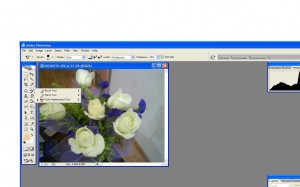
First, I used a photo of my roses. I want one of my roses to be blue in colour.

 Tutorial: How to replace a colour in a picture using the colour
replacement tool

photoshop1 300x187 Tutorial: How to replace a colour in a picture using the colour
replacement tool

Flower1

Next,  I pick the colour replacement tool which is hidden under the brush option on the toolbar

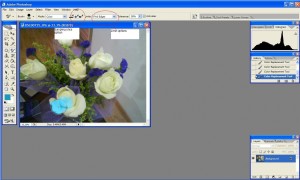
I change limits to sampling once, and find edges shown on the photo below.
photoshop2 300x180 Tutorial: How to replace a colour in a picture using the colour
replacement tool

Next, I begin to paint on my object, in this case, the yellow rose at the bottom. My options enabled me to find the edges of the rose without painting over the boundaries. The tolerance settings can be changed in case this happens. If too much area is painted, the tolerance should be reduced, if the paint is not flowing freely, the tolerance should be increased.

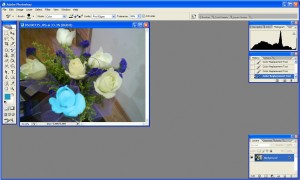
My rose is now blue.Awesome.
photoshop3 300x180 Tutorial: How to replace a colour in a picture using the colour
replacement tool


Like this post? Share it!

digg 48 Tutorial: How to replace a colour in a picture using the colour
replacement tool reddit 48 Tutorial: How to replace a colour in a picture using the colour
replacement tool stumbleupon 48 Tutorial: How to replace a colour in a picture using the colour
replacement tool delicious 48 Tutorial: How to replace a colour in a picture using the colour
replacement tool furl 48 Tutorial: How to replace a colour in a picture using the colour
replacement tool technorati 48 Tutorial: How to replace a colour in a picture using the colour
replacement tool google 48 Tutorial: How to replace a colour in a picture using the colour
replacement tool myspace 48 Tutorial: How to replace a colour in a picture using the colour
replacement tool facebook 48 Tutorial: How to replace a colour in a picture using the colour
replacement tool twitter 48 Tutorial: How to replace a colour in a picture using the colour
replacement tool
share save 171 16 Tutorial: How to replace a colour in a picture using the colour
replacement tool

No related posts.

About liwun

Beautiful lady who has the passion for drawing. Fun and lovable. She writes mostly on Adobe illustrator categories and is one of the first guest author of Hungred.com. You can see a lot of drawing produce by her on her personal blog. She is also the founder of 1sitedaily
This entry was posted in Adobe Photoshop, How-to and tagged . Bookmark the permalink.

Comments are closed.