

Tutorial: How to draw a flower petal using Adobe Illustrator

This is a tutorial on how to draw a simple flower petal using Adobe Illustrator. I use Adobe Illustrator CS4, but most of the tools are the same in the earlier versions.

With the pen tool, draw a triangle. Join all the dots.
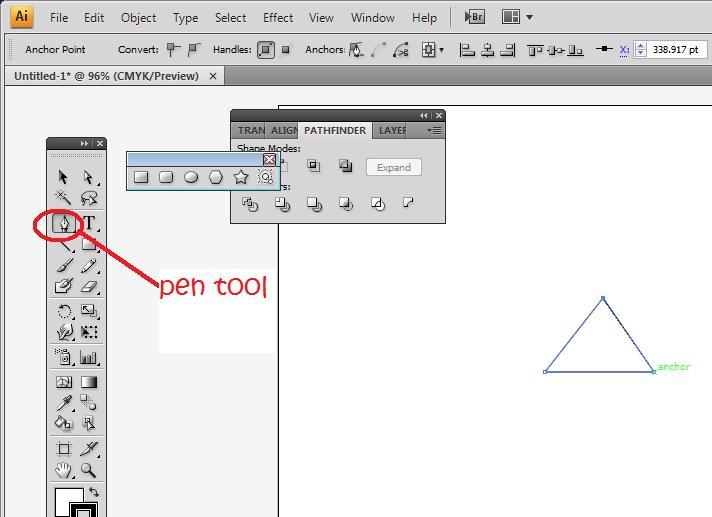
flowerpetal1 Tutorial: How to draw a flower petal using Adobe Illustrator

Then select the path with the selection tool (V) and clicking on swatch, select a gradient filled swatch to fill in the triangle. Illustrator is annoying in a way that it doesn’t allow you to fill in a coloured gradient just by clicking on gradient.
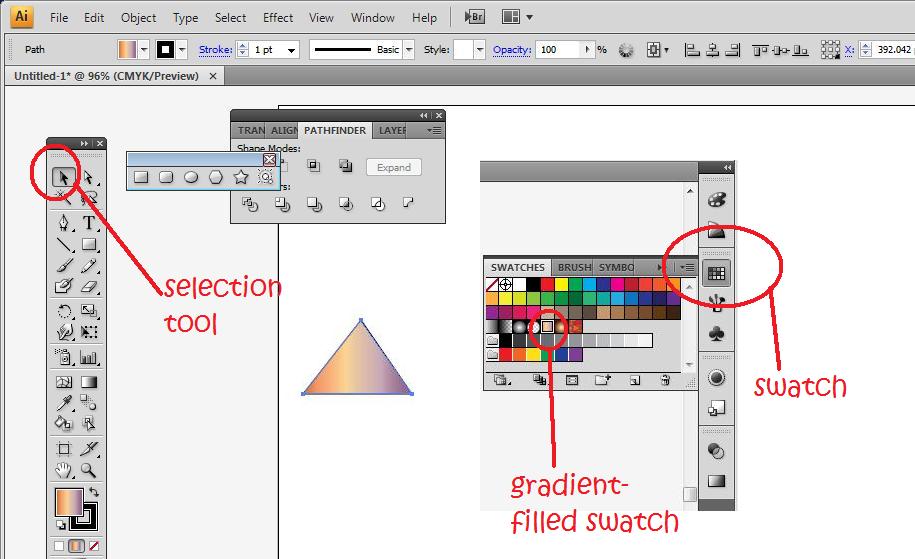
flowerpetal2 Tutorial: How to draw a flower petal using Adobe Illustrator

Next, click on gradients (Window>Gradients). Select the linear gradient. I chose a light pink (double click on the square on the gradient bar to choose the colour) followed by a darker pink on the gradient bar. I then changed the angle of the gradient to -98 to that the light pink is at the tip of the triangle.
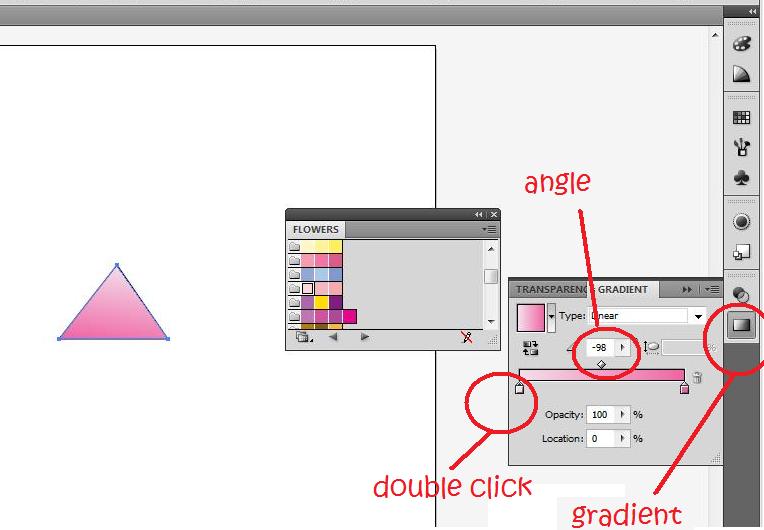
flowerpetal3 Tutorial: How to draw a flower petal using Adobe Illustrator

Next by clicking on the curve handle tool, which is hidden under the pen tool (hold the click of the pen tool and choose the curve handle). I click on the anchor on the bottom left of the triangle and drag downwards. This would result in a curved path.
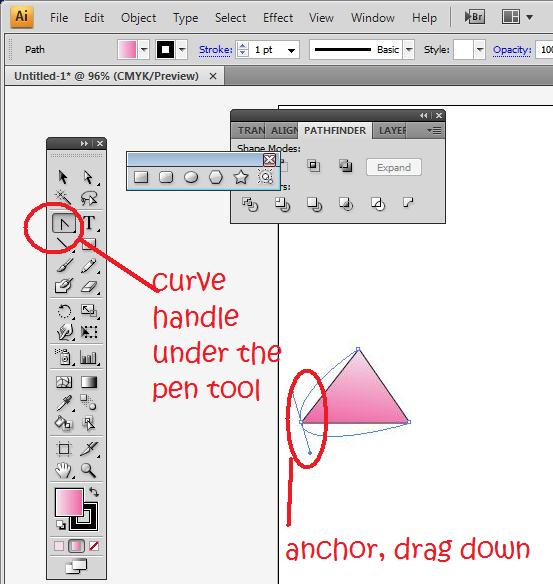
flowerpetal4 Tutorial: How to draw a flower petal using Adobe Illustrator

I then click on the right anchor and drag it upwards instead of downwards. You should adjust so that the petal shape that you want is achieved.
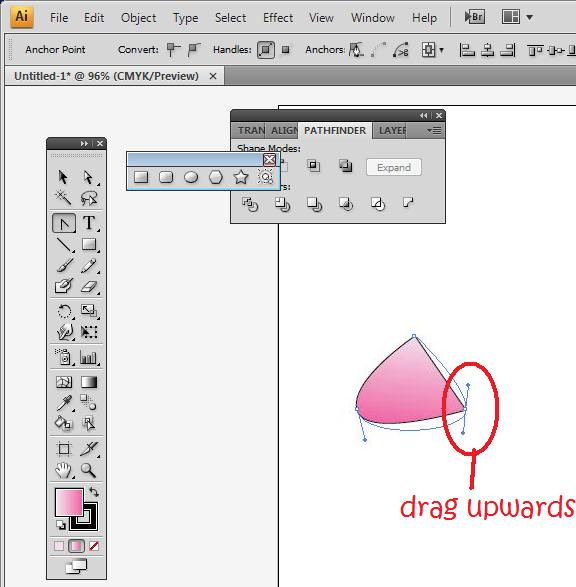
flowerpetal5 Tutorial: How to draw a flower petal using Adobe Illustrator

If the tip of the petal is too sharp, use the curve handle to change the shape. In the end, you get a petal that looks like this!

flowerpetal61 Tutorial: How to draw a flower petal using Adobe Illustrator

You can do countless things with this. I duplicated it five times and rearranged it to look like a flower, or you can even duplicate it and rotate it around to achieve the image of falling petals.
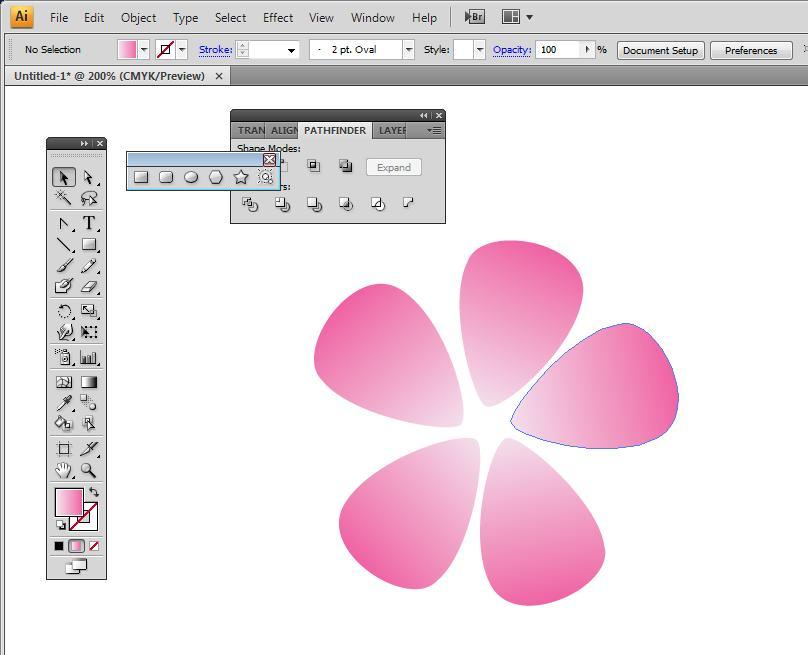
flowerpetal7 Tutorial: How to draw a flower petal using Adobe Illustrator


Like this post? Share it!

digg 48 Tutorial: How to draw a flower petal using Adobe Illustrator reddit 48 Tutorial: How to draw a flower petal using Adobe Illustrator stumbleupon 48 Tutorial: How to draw a flower petal using Adobe Illustrator delicious 48 Tutorial: How to draw a flower petal using Adobe Illustrator furl 48 Tutorial: How to draw a flower petal using Adobe Illustrator technorati 48 Tutorial: How to draw a flower petal using Adobe Illustrator google 48 Tutorial: How to draw a flower petal using Adobe Illustrator myspace 48 Tutorial: How to draw a flower petal using Adobe Illustrator facebook 48 Tutorial: How to draw a flower petal using Adobe Illustrator twitter 48 Tutorial: How to draw a flower petal using Adobe Illustrator
share save 171 16 Tutorial: How to draw a flower petal using Adobe Illustrator

No related posts.

About liwun

Beautiful lady who has the passion for drawing. Fun and lovable. She writes mostly on Adobe illustrator categories and is one of the first guest author of Hungred.com. You can see a lot of drawing produce by her on her personal blog. She is also the founder of 1sitedaily
This entry was posted in Adobe Illustrator, How-to and tagged . Bookmark the permalink.

2 Responses to Tutorial: How to draw a flower petal using Adobe Illustrator

  1. Pingback: Illustrator: Drooping petals | LiwunLoo

  2. Pingback: Three great work at home opportunities — Hobby Cash: Make Cash Blogging About the Things You Love