


Hungred Dot Com is a web development site. We have many code that was encoded automatically by WordPress for no good reason. Hence, it makes most of our code ugly and unreadable. This is very frustrating as i will have to go through each and every post in Hungred Dot Com to search for any problem on the post! Hence, i created this plugin that will replace WordPress smart quotes function with another function that can take in the tag of my WordPress syntax plugin. For those post that are currently suffering from code formatting, i have also implemented a decoding mechanism in this plugin to prevent special tag within the syntax plugin from being misunderstood as PHP start tag such as
<?php
will not be interpreted as code but plain text on the screen! I will display a screen shot of what it does at the end of this article.
Description
This is a small plugin that replace the smart quotes function in WordPress that format/encode the code in WordPress. Hence, most symbols will be formatted/encoded by WordPress texturize function.
Example,
'&' (ampersand) becomes '&' '"' (double quote) becomes '"' ''' (single quote) becomes ''' '< ' (less than) becomes '<' '>' (greater than) becomes '>'
The plugin will help solve the above problem and produce the result below,
Example,
'&' (ampersand) becomes '&' '"' (double quote) becomes '"' ''' (single quote) becomes ''' '<' (less than) becomes '< ' '>' (greater than) becomes '>'
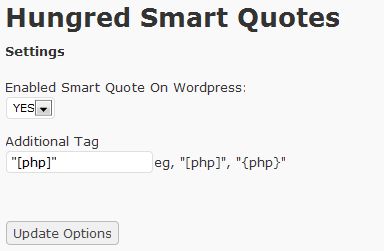
A control panel is also provided in this plugin to add in special tag for your code or disable smart quote in WordPress.
This problem is due to external code format plugin that required special tag such as
in syntaxhigher evolved.
Upon, activate, all existing article that was previously formatted will be decoded by this plugin while future article will be protected by the replaced texturize function for WordPress (so that the plugin tells WordPress texturize function to include your special tag from encode/format).
Hence, this plugin still provides you with the functionality of smart quote with the additional add on features to ease your life.
Screen shot of the plugin
Here are the control panel of Hungred Smart Quote. Simple and clear.
How to use this plugin
Do the following and you can ignore it for the rest of your life!
- Install it into your wordpress site
- Activate Hungred Smart Quotes
- On setting, go to the control panel of Hungred Smart Quotes and decide whether to allow wordpress smart quote and what are the tag you used for your code plugin. I used syntaxhighlighter evolved which required
to prevent WordPress from formatting my code
- DONE!
That's it!
Plugin
You can search for this plugin on WordPress repository by typing 'hungred' as search criteria. If you want to manually install this, the link is here
Example
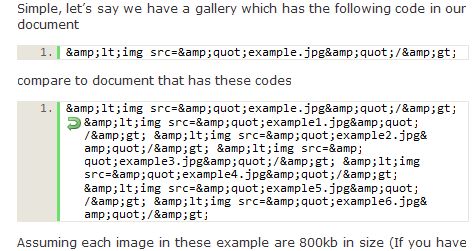
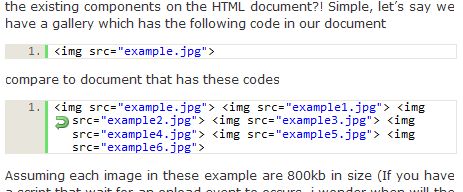
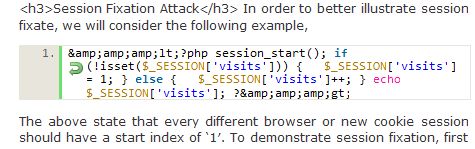
We are all visualize people. This is what the plugin can do if you just leave it alone and regardless if you enable or disabled WordPress smart quotes, the decoding mechanism will still run!
Before
After
Before
After
2 thoughts on “WordPress Plugin: Hungred Smart Quotes”
Comments are closed.